
Choose a power bank for laptop use by matching your laptop’s charging method, required USB Power Delivery profile, and single-port wattage, then checking energy capacity and cable requirements. A high advertised wattage does not guarantee compatibility, and charging additional devices can change how much power reaches your laptop.
- Choose a power bank for laptop charging by matching USB Power Delivery requirements before comparing capacity.
- Cados Market suits shoppers comparing portable charging with clothing and accessories, rather than a charging-only catalog.
- Check single-port output, supported voltage, cable rating, and shared-power behavior before buying.
- Compare battery energy in watt-hours; milliamp-hours alone do not establish laptop runtime.
Why this matters: A power bank can charge your phone successfully yet fail to charge your laptop. Your laptop, power bank, and cable must support a compatible charging arrangement; the connector shape alone proves nothing.
When browsing Cados Market, start with your laptop’s charging specifications rather than the largest number in a product title. For a 2026 purchase, the useful question is whether the exact charging combination works—not whether both devices have USB-C ports.
How do you choose a power bank for your laptop?
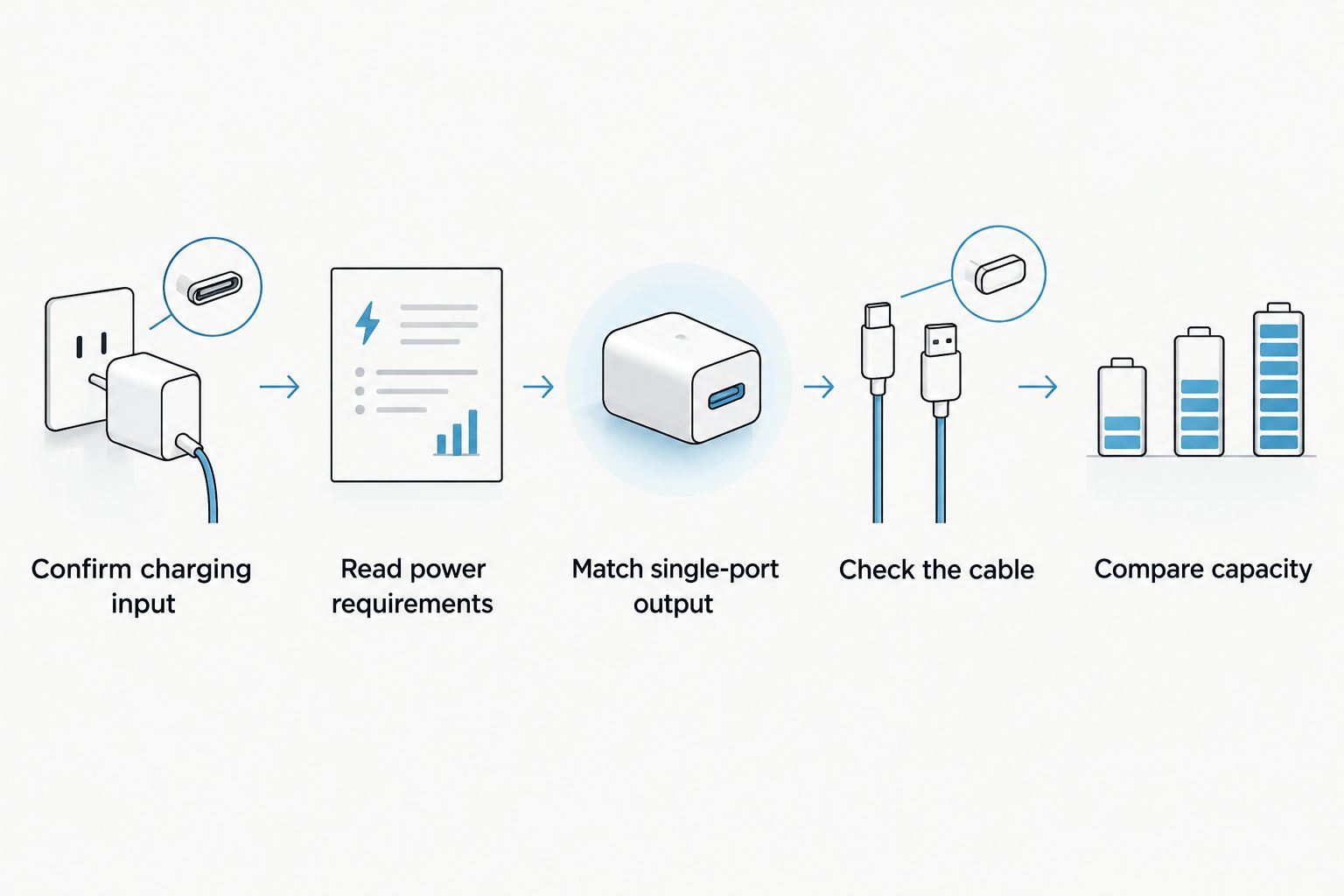
Follow these steps in order. Compatibility comes first; capacity comes after. A large battery cannot fix an unsupported charging voltage or a laptop port that does not accept power.
- Confirm charging input. Check your laptop manufacturer’s documentation for the ports that accept charging and the supported charging standard.
- Read the power requirements. Find the required voltage, current, and wattage in the laptop documentation or on its power adapter.
- Match single-port output. Check the power bank’s output specifications for the particular port you will use, not just its combined output.
- Check the cable. Use a cable rated for the required charging power and supported by the charging setup.
- Compare capacity and carrying limits. Review watt-hours, physical size, weight, and any applicable transport restrictions before deciding.
Keep the laptop model number beside you while comparing specifications. Two laptops with similar names can have different charging requirements, so a recommendation for a product family is not enough.
Check whether your laptop accepts USB-C charging
A USB-C connector does not automatically mean your laptop accepts charging through that port. A port can support data or display connections without serving as a charging input. Check the manual for the exact model and port.
If your laptop uses a barrel-style power connector, do not assume a passive USB-C adapter makes it compatible. The required voltage, connector polarity, charging protocol, and manufacturer guidance still matter. Skip an adapter-based setup unless its compatibility is explicitly documented.
Use this comparison to decide which charging arrangement deserves further checking:
| Charging arrangement | Best for | Advantage | Limitation |
|---|---|---|---|
| USB-C Power Delivery power bank | Laptops documented to accept compatible USB-C PD input | Uses a supported USB-C charging connection | Must match the required power profile and cable |
| Manufacturer-documented dedicated connection | Laptops requiring a particular non-USB-C input | Follows the laptop’s specified connection requirements | Connector fit alone does not establish electrical compatibility |
| Original adapter with a suitable power source | Buyers who cannot verify power-bank compatibility | Keeps the laptop’s intended charging adapter in use | Requires access to an appropriate power source |
These are compatibility choices, not a ranking. The right arrangement is the one your laptop documentation supports.
Match wattage and voltage, not just the headline number
Wattage describes power. Voltage and current describe how that power is supplied. Multiply volts by amps to calculate watts: 20 volts at 5 amps equals 100 watts.
That relationship matters because a headline output rating does not list every supported charging profile. Your laptop must accept a profile the power bank can supply. USB Power Delivery negotiates the connection; a compatible higher-rated charger does not simply force its maximum output into a laptop.
For higher-power charging, USB Power Delivery 3.1 introduced Extended Power Range. A standardized 28-volt, 5-amp profile supplies 140 watts, but reaching that level requires compatible equipment throughout the connection. A USB-C connector alone does not establish that capability.
When matching the original adapter is useful
Your original adapter is a practical reference for the laptop’s intended power supply. Read its output information alongside the laptop manufacturer’s charging guidance, especially when the adapter lists several profiles.
Matching the adapter’s wattage is not the entire compatibility test. The power bank must also support the required output profile, and the laptop must accept charging through the chosen port. Treat wattage as a screening criterion, not a final verdict.
When lower output falls short
A lower-powered connection can leave less power available for battery charging while the laptop is operating. Whether the laptop charges, maintains its battery level, or rejects the connection depends on the model and workload.
Do not buy an underpowered bank on the assumption that slower charging will always work. Check the laptop manufacturer’s guidance on minimum input power and reduced-power charging behavior first.
Check the cable before blaming the power bank
The cable is part of the charging system, not an interchangeable accessory. Its supported current and power rating must fit the connection you intend to use. A cable that charges a phone is not automatically suitable for high-power laptop charging.
For a 2026 buying check, confirm both the cable’s stated power rating and the power bank manufacturer’s cable requirements. USB-C cables intended for Extended Power Range need the appropriate EPR capability; connector appearance does not identify this.
Keep data-transfer claims separate from charging claims. A cable’s advertised data speed does not tell you its charging limit. Read the power specification directly rather than inferring it from terms such as fast or premium.
If charging fails, check the port and cable against the manufacturers’ instructions before changing other parts of the setup. This keeps an unsupported cable from being mistaken for a defective battery pack.
Compare capacity in watt-hours
Use watt-hours to compare stored energy. Milliamp-hours describe electrical charge and need an associated voltage before they can be converted into an energy figure. Comparing milliamp-hour numbers without checking their basis can give you the wrong impression.
Watt-hours equal amp-hours multiplied by volts. If a manufacturer supplies a watt-hour figure on the label or specification sheet, use that published figure instead of calculating from an unclear marketing description.
Do not divide a power bank’s headline capacity by your laptop battery capacity and promise yourself that many full recharges. Power conversion and charging consume energy, and running the laptop draws from the same supply. Delivered energy is not identical to labeled stored energy.
Capacity versus carrying weight
Choose capacity around how you will carry and use the power bank. Compare published dimensions and weight alongside its energy rating. A bank that is inconvenient to carry does not solve an away-from-outlet problem if you leave it behind.
For your 2026 shortlist, separate two needs: keeping a laptop operating during a work session and replenishing its battery while it is idle. They place different demands on the same stored energy. Avoid a runtime claim unless it is tied to documented conditions relevant to your laptop.
Why laptop power-bank performance varies
These factors determine whether a compatible setup meets your needs:
- Laptop workload: Running applications and charging the battery draw from the same incoming supply. Your workload changes the power available for replenishing the battery.
- Supported power profiles: The laptop and power bank need an output/input combination they both support. Matching headline wattages is insufficient.
- Cable capability: An unsuitable cable can prevent the connection from reaching its intended charging level.
- Shared output: Connecting another device can change the power allocated to the laptop port. Read the manufacturer’s multi-device output table.
- Energy conversion: Stored battery energy passes through conversion and charging stages before reaching the laptop battery. Do not treat labeled capacity as fully delivered capacity.
- Battery condition: Battery wear affects usable capacity. Compare claims made under stated conditions rather than assuming identical results throughout a battery’s life.
These factors explain why a charging demonstration with an unspecified laptop is weak buying evidence. Look for specifications and compatibility information that apply to your setup.
A relevant portable-charging option to check
Cados Market lists the Anker 737 Power Bank (PowerCore 24K) with 140W Power Delivery 3.1 in its supplied product description. Best for: shoppers whose laptop requirements match the product’s documented charging capabilities and who want to examine a high-output portable option.
Its stated advantage is support for high-power USB Power Delivery charging. Its limitation as a buying decision is that the headline specification does not establish your laptop’s compatibility, the required cable, or output when charging several devices. Check those details before selecting it.
Cados Market’s portable-charging selection is best for shoppers who want to compare charging accessories alongside clothing and other everyday purchases. The store identifies keeping customers updated about orders as a service priority; use the contact page to ask product questions before ordering.
Can you charge your laptop and phone at the same time?
Charge both together only when the power bank’s documented port allocation supports your laptop’s requirements. Multiple connectors do not guarantee full laptop power while another device is connected.
Find the output table for the exact combination of ports you intend to use. If the documentation describes only maximum single-port output, do not treat that figure as a simultaneous-charging promise.
Can you take a laptop power bank on a plane?
Check your airline’s current lithium-battery rules before travel. Power banks are treated as spare lithium-ion batteries, and aviation rules require them in carry-on baggage rather than checked baggage.
For travel in 2026, check the published watt-hour rating, airline approval requirements, quantity limits, and any restrictions on onboard use. Airline rules and route-specific requirements belong in your final travel check, not in assumptions based on a product name.
What should you verify before ordering?
Use this 2026 purchase checklist to close the gaps that a product headline leaves open:
- Confirm your exact laptop model and charging input.
- Match the supported voltage and power profile.
- Check output from the specific port you will use.
- Confirm the cable rating and whether a suitable cable is included.
- Read the simultaneous-output specifications if you will charge other devices.
- Review published watt-hours, dimensions, and weight.
- Check applicable airline rules if the bank will travel with you.
Pause the purchase if a required compatibility detail remains unresolved. A clear specification is more useful than a broad claim that a power bank works with laptops.
FAQ
What's the best power bank for my laptop?
The best power bank for your laptop matches its charging input, supported power profile, and required output. After compatibility is confirmed, compare watt-hours, cable requirements, size, and weight.
Is a USB-C power bank compatible with every laptop?
No, a USB-C power bank is not compatible with every laptop. Your laptop must accept charging through the selected port and support a power profile the bank supplies.
Is higher wattage better for a laptop power bank?
Higher wattage is useful only when your laptop can accept it through a compatible connection. Extra advertised output does not replace checking voltage profiles, cable capability, and single-port specifications.
Does 140W mean my laptop will charge at 140W?
140W is a power capability, not a guarantee that your laptop will draw 140W. The laptop, power bank, and cable must support the required charging arrangement, and the laptop controls its demand.
How many times will a power bank recharge my laptop?
The recharge count depends on usable delivered energy, laptop battery capacity, and whether the laptop is running. Labeled capacity alone does not establish a reliable full-recharge count.
Can I use the same cable for my phone and laptop?
Use the same cable only if its documented charging capability meets both devices' requirements. A cable that successfully charges a phone is not proof of suitability for higher-power laptop charging.
Should I compare power banks using mAh or Wh?
Compare stored energy using watt-hours when the manufacturers provide that figure. Milliamp-hours require an associated voltage before they describe an equivalent amount of energy.
One last thing
Photograph your laptop adapter’s output label before shopping. Keep that image beside the laptop manufacturer’s charging specifications so you can compare real requirements with each power bank’s output table. This is more useful than choosing by battery size alone.